Power Automate vs Zapier: The 2026 SMB Guide
If you’re deciding between Power Automate and Zapier, you’re probably already feeling the pain. Staff are rekeying data from emails into spreadsheets. Sales updates sit in one system while customer service works from another. Approvals happen in inboxes, then vanish. Every team has built its own workaround, and none of them scale.
That’s the point where automation stops being a nice idea and becomes an operational decision. Pick the right platform and you cut friction without creating governance problems. Pick the wrong one and you automate chaos.
Ending the Grind of Manual Business Processes
A typical East Midlands business doesn’t struggle because people are lazy. It struggles because good people are stuck doing low-value admin all day. One person exports a CSV from Dynamics 365. Another copies it into Excel. Someone else emails a manager for approval, then chases them in Teams because the email got buried.
That’s not a systems problem alone. It’s a process problem.

If you need a plain-English explanation before comparing tools, this guide on what is workflow automation is useful because it frames automation as process design, not just software setup. The same applies if you want a Microsoft-focused explanation of workflow automation for business teams.
The real choice most IT Directors face
For most small and mid-sized firms, power automate vs zapier isn’t a theoretical comparison. It’s a practical one.
You’re usually deciding between two very different routes:
Business needBetter fitQuick cloud app connections across mixed softwareZapierDeep automation inside Microsoft 365, SharePoint, Teams, Azure, and Dynamics 365Power AutomateLegacy desktop systems that still matterPower AutomateFast setup for non-technical teamsZapierStronger governance in a Microsoft-centric estatePower Automate
Practical rule: If your staff already live in Outlook, Teams, SharePoint and Dynamics 365, forcing a separate automation layer on top of that stack is usually the wrong move.
Zapier is good software. But it isn’t the best answer for every business. If your environment is heavily Microsoft-based, Power Automate is usually the smarter long-term choice.
Understanding the Philosophies of Each Platform
An IT Director in the East Midlands usually is not choosing between two equal automation tools. You are choosing between two operating models.
That distinction matters more than the feature list.
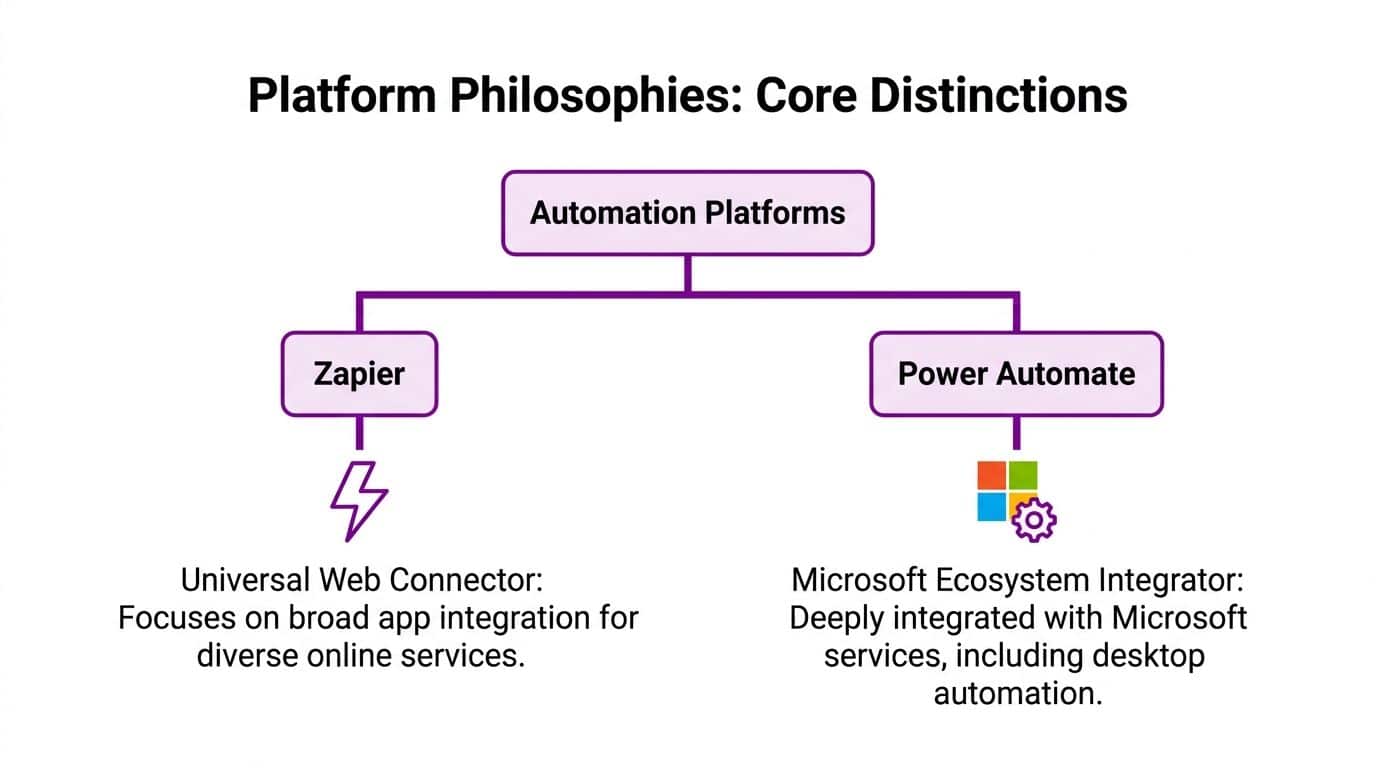
Zapier was built to connect cloud apps quickly. Its job is speed. A team spots a repetitive task, links two services, and gets a result without much platform planning. That makes sense in businesses with a broad mix of SaaS products and limited internal IT control over how departments buy software.
Power Automate was built for a different environment. It sits inside the Microsoft stack and works best when automation needs to follow the same rules as identity, security, data handling, and administration across Microsoft 365, Azure, Dynamics 365, SharePoint, Teams, and Windows-based systems.
Zapier prioritises speed and coverage
Zapier is designed for fast app-to-app automation. That is its appeal and its limit.
Its model suits organisations that need to connect a wide spread of online tools without waiting for formal IT projects. Department heads, operations managers, and admin teams can often set up simple automations themselves. For a business running mixed tools across sales, marketing, support, and finance, that can remove manual work quickly.
The problem appears later. Fast adoption often creates scattered automations, inconsistent ownership, and weak change control. In UK businesses handling customer records, financial approvals, or regulated data, that becomes an IT issue very quickly.
Power Automate prioritises control, standardisation, and Microsoft alignment
Power Automate is designed around process control inside a managed estate. That is why it feels heavier. It expects the business to care about who can build flows, where data moves, how approvals are recorded, and how automation fits with existing Microsoft security and administration.
For Microsoft-centric organisations, that is a strength.
You get tighter alignment with Entra ID, Microsoft 365 permissions, SharePoint structures, Teams-based approvals, and Azure services. You also get a better path for organisations that still rely on desktop applications, shared drives, on-prem systems, or older line-of-business platforms that have not disappeared just because the business bought cloud software.
That matters in actual situations. Many UK small and mid-sized firms are not greenfield SaaS businesses. They are running modern Microsoft services alongside older operational systems, and they still need governance that stands up to audit, cyber insurance questions, and compliance reviews.
The real philosophical gap is governance
The biggest difference is not ease of use. It is who the platform is built to satisfy.
Zapier is built for teams that want results first and structure second. Power Automate is built for organisations that need automation to fit an existing IT and compliance model from day one.
If your business is already invested in Microsoft 365 and Azure, Power Automate usually fits the way you already manage identity, access, retention, and oversight. That is a better position for GDPR accountability, internal approval controls, and clear ownership of business-critical workflows.
A simple recommendation works here. Choose Zapier if your main problem is connecting a wide range of cloud apps quickly. Choose Power Automate if your main problem is automating business processes properly inside a Microsoft environment without creating another layer for IT to police later.
A Detailed Comparison of Core Capabilities
An IT Director in the East Midlands usually faces this choice after a few quick automation wins. One department wants more app connections. Another wants approvals, document controls, and auditability. The wrong platform turns both requests into support debt.
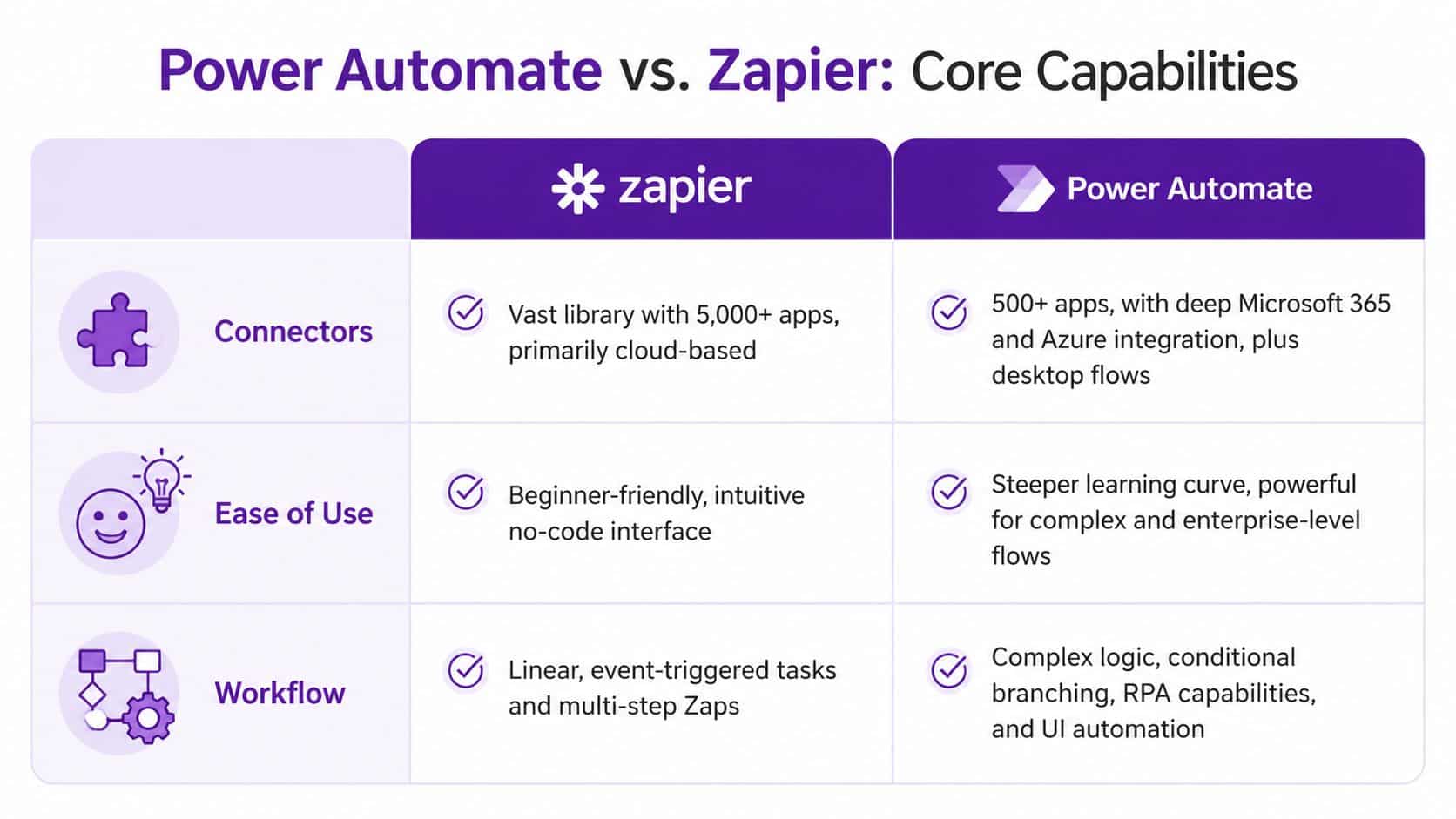
Core capability comes down to four practical questions. What does it connect well. Who can build with it safely. How much process logic can it handle. How easy is it to control once several teams depend on it.
CapabilityZapierPower AutomateDirect adviceConnector coverageWider app catalogue across cloud SaaS toolsStrong coverage across Microsoft products and common business systemsChoose Zapier for broad SaaS estates. Choose Power Automate for Microsoft-led estates.Integration depthGood for standard app-to-app actionsBetter for Microsoft data, permissions, approvals, and business contextDepth matters more than volume if core processes sit in Microsoft 365 or Dynamics 365.Ease of buildFaster for simple workflowsMore demanding, but better suited to controlled business processesPick the tool your team can support properly, not the one that looks easiest in a demo.Workflow complexityBest for straightforward cloud automationsBetter for branching logic, approvals, document processes, and desktop-linked workComplex internal processes belong in Power Automate.Control and oversightWorks well for decentralised automationFits central IT, policy, security, and audit requirements betterIf governance matters, Power Automate is the safer choice.
Connector count is the wrong headline
Zapier usually wins the volume argument. It connects to more cloud applications, especially specialist SaaS products used by sales, marketing, ecommerce, and operations teams.
That matters if your business runs across many non-Microsoft tools.
It matters less if your important work lives in Outlook, Teams, SharePoint, Dynamics 365, Excel, and Azure. In that situation, Power Automate’s value comes from how well it works inside the Microsoft stack, not from chasing the biggest connector library. For UK businesses already standardised on Microsoft 365, that depth usually has more business value than a longer list of logos.
Use this rule.
- Choose Zapier if teams need to connect a wide mix of cloud apps quickly.
- Choose Power Automate if key workflows depend on Microsoft data, Microsoft identity, and Microsoft permissions.
- Choose Power Automate if process ownership sits with IT, compliance, finance, or operations rather than a single department.
Ease of use only matters if the result stays manageable
Zapier is easier for business users to pick up. That is one of its best features. A department manager can build a basic workflow quickly and get a result without much help from IT.
Power Automate asks for more discipline. Users need to understand conditions, variables, approvals, exception paths, and access controls. That slows the first build. It improves the long-term result when the workflow matters.
For IT Directors, the better test is ownership. Who will maintain the automation, review failures, control permissions, and document the logic for audit or handover? In a Microsoft-centric environment, Power Automate usually gives you a cleaner operating model because it sits closer to the tools and controls your business already uses.
That becomes even more important if your team is already tightening standards around retention, access, and data governance consulting for regulated Microsoft environments.
Workflow design is where the gap widens
Zapier handles straightforward automations well. A form submission creates a CRM record. A new deal sends a Slack alert. A spreadsheet update creates a task. Those are useful workflows, and Zapier is good at them.
Business processes rarely stay that simple.
Power Automate is stronger when a workflow needs internal logic. That includes multi-stage approvals, document routing, conditional actions based on value or department, and process steps tied to Microsoft records and permissions. If finance, HR, operations, or customer service depend on the flow, this matters more than a slick setup screen.
A practical split looks like this:
Zapier is a good fit for:
- Marketing and sales handoffs across cloud tools
- Notifications between web apps
- Simple lead routing and task creation
- Department-led automations with limited compliance impact
Power Automate is a better fit for:
- Approval workflows tied to Teams, Outlook, or SharePoint
- Document-centric processes in Microsoft 365
- Dynamics 365 actions across sales, service, and finance
- Workflows that need stronger permission control and audit history
- Automations that must fit UK governance expectations from the start
Governance affects capability in practice
A platform is only as useful as your ability to control it once adoption spreads.
Zapier can drift into departmental sprawl. Different teams build similar automations, use inconsistent naming, and store business logic in places IT does not review closely. That creates risk for change control, offboarding, and incident response.
Power Automate has its own failure mode. Poorly designed flows become hard to support if nobody applies standards. The difference is that Microsoft-centric organisations usually have a better chance of bringing Power Automate into existing admin, identity, security, and compliance processes.
For UK small and mid-sized businesses, that point is often missed. GDPR accountability, cyber insurance questions, and internal audit requests all become harder when automation sits outside the systems your IT team already governs.
If your organisation looks like thisChoose thisBroad mix of SaaS tools, low governance overhead, speed matters mostZapierMicrosoft 365-led environment with central IT oversightPower AutomateCritical workflows involve SharePoint, Teams, Outlook, or Dynamics 365Power AutomateBusiness units need quick, lightweight web app automationsZapier
My recommendation on core capability fit
Choose Zapier if you need fast cloud app integration and your governance demands are light.
Choose Power Automate if your business runs on Microsoft 365 and Azure, or if you expect automation to become part of core operations rather than a set of isolated departmental fixes.
For most established firms in the East Midlands with a serious Microsoft investment, Power Automate is the better platform. It fits the systems you already run, the controls you already need, and the level of operational ownership your IT team will be asked to provide.
Advanced Automation RPA AI and Governance
Your finance team still has one process that depends on a Windows desktop, a shared mailbox, and somebody rekeying figures into an old line-of-business system every afternoon. That is the point where the Power Automate vs Zapier comparison changes. One tool is built mainly for cloud app orchestration. The other can reach into desktop processes, approvals, documents, identity controls, and Microsoft data services that already sit inside your estate.

RPA is the real separation point
If a workflow depends on browser clicks, desktop applications, or systems with poor API access, Zapier stops being the obvious option. Power Automate has desktop automation for exactly this type of work. That matters in established UK businesses where operations still rely on legacy finance tools, on-prem applications, or supplier portals that were never designed for modern integration.
This is not a small product difference. It changes which processes you can automate at all.
For an IT Director in a Microsoft-led business, that means Power Automate can cover both the modern workflow and the awkward gap around it. You do not need one platform for cloud SaaS and another workaround for desktop tasks.
AI matters when your inputs are messy
Real business processes rarely start with perfect structured data. They start with emailed PDFs, scanned forms, handwritten notes, invoice attachments, and approval records spread across Outlook, Teams, SharePoint, and file shares.
Power Automate has a stronger position here because AI features sit closer to the workflow and to Microsoft services many firms already use. If your process needs document extraction, classification, or routing inside Microsoft 365, keeping that work in the same platform is usually the cleaner design choice.
Zapier can still connect to AI tools. That is useful. It is not the same as managing the workflow, identity, data handling, and document processing within one governed environment.
If the process lives in Microsoft 365, keep the intelligence there as well.
High-volume workflows expose weak design fast
A lightweight marketing alert and a business-critical operational process are not the same thing. Once automations run all day, touch multiple teams, or sit inside customer service, finance, HR, or compliance operations, supportability becomes as important as speed of setup.
Power Automate is usually the better fit for that class of work in Microsoft estates because it gives IT more control over environments, approvals, connectors, and ownership. Zapier remains effective for quick departmental automation, but it is less convincing when the workflow becomes part of day-to-day operations and failure has an audit, service, or revenue impact.
That is the point many SMBs miss. The question is not just whether an automation can run. The question is whether your team can own it properly six months later.
Governance should drive the decision
IT leadership must be firm. If automation touches personal data, finance approvals, customer records, or regulated processes, governance is not an optional extra added after launch. It has to be part of platform selection.
Power Automate fits more naturally into Microsoft identity, access control, audit, and administration practices. For organisations already using Entra ID, Microsoft Purview, SharePoint, Teams, and Azure, that alignment reduces friction for policy enforcement and review. It also gives internal IT a clearer line of sight over who built what, which connectors are in use, and where data moves.
For UK small and mid-sized businesses, that has direct consequences. GDPR accountability, cyber insurance questionnaires, subject access requests, and internal audits are easier to handle when automation sits inside systems your IT team already governs. If you need tighter standards around ownership, permissions, retention, and audit evidence, structured data governance consulting for Microsoft environments should sit alongside the automation rollout.
UK compliance needs proper design, not assumptions
Power Automate is usually the stronger strategic choice for Microsoft-centric firms in the East Midlands. It also deserves more discipline. Once flows handle personal data, approval history, payroll inputs, customer communications, or case records, you need clear rules on environment strategy, connector use, service accounts, retention, and monitoring.
That is particularly relevant for UK organisations dealing with GDPR obligations and ICO scrutiny around automated processing, access control, and auditability. A rushed rollout creates avoidable risk. A controlled rollout gives you automation that stands up to security review, board scrutiny, and operational support.
My recommendation on advanced use
Choose Power Automate if any of the following applies:
- You need desktop automation or RPA
- Your process depends on SharePoint, Teams, Outlook, or Dynamics 365 data
- You want AI-driven document handling inside Microsoft workflows
- You need stronger control over environments, permissions, and auditability
- You expect automation to become part of core operations, not just team-level convenience
Choose Zapier if the workload stays mostly cloud to cloud, the processes are lighter, and central governance is not a major concern.
For most established Microsoft-focused businesses in the East Midlands, Power Automate is the better long-term platform. It does more, fits governance better, and gives IT a stronger operating model. The trade-off is simple. You must design it properly from the start.
Pricing and Licensing A Practical Cost Analysis
A finance lead signs off a low monthly automation subscription. Six months later, IT is dealing with unpredictable task overages, duplicate workflows, another identity model, and no clear answer on who owns support.
https://www.f1group.com/power-automate-vs-zapier/

