How to Reduce IT Costs: Smart Savings for SMBs
Rising IT costs usually don’t arrive as one dramatic bill. They creep in. A few extra Microsoft 365 licences that nobody questioned. An Azure workload left on the default setting. A file storage tool renewed because nobody realised the same function was already included elsewhere. By the time a business owner in Nottingham sits down with the quarterly accounts, the total often looks far higher than expected.
That pressure is familiar across the East Midlands. Technology is meant to help a business move faster, serve customers better, and stay secure. If the spend isn’t managed properly, it starts doing the opposite. It drains cash, creates duplication, and leaves directors wondering whether they’re paying enterprise prices for mid-sized results.
The good news is that learning how to reduce IT costs rarely starts with cutting useful systems. It starts with removing waste, tightening decisions, and getting more from the Microsoft tools you already pay for. In practice, the biggest wins often come from better licence management, sharper Azure governance, and a more disciplined approach to procurement and automation.
That matters even more for firms trying to scale without adding overhead everywhere else. If you’re also reviewing wider operational efficiency, there’s useful reading on how outsourced support models can grow your business with BPO alongside internal technology improvements.
Introduction
A business owner in Leicester opens the monthly management pack and sees the same pattern again. Software spend is up. Cloud charges are up. Support costs feel scattered across too many suppliers. Nothing appears completely unreasonable on its own, but the total has become hard to defend.
That’s where many cost reduction conversations go wrong. People assume the answer is to slash budgets or postpone upgrades. In reality, the strongest savings come from optimisation, not retreat. You keep the systems that support the business and remove the waste that built up around them.
For East Midlands firms using Microsoft 365, Azure, Dynamics 365, Copilot, and the Power Platform, there’s usually far more room to improve than finance teams expect. Inactive accounts stay licensed. Staff sit on plans they no longer need. Third-party tools overlap with SharePoint, OneDrive, and Teams. Azure estates grow faster than governance.
A sensible cost plan protects productivity first. If a saving damages service, security, or staff output, it isn’t a saving for long.
The practical mindset is simple. Start by understanding exactly what you own. Then challenge every item by asking four questions:
- Is it used or is it legacy spend?
- Is it sized correctly for the person or workload?
- Does Microsoft already include it somewhere else in the stack?
- Does it reduce risk and effort, or has it become a line item with no clear owner?
A lot of IT overspend sits in ordinary places. It isn’t hidden behind technical complexity. It’s hidden behind routine. Bills get approved because they were approved last month. Platforms stay oversized because nobody has time to review them.
That’s fixable. The rest of this guide stays focused on what works in practice for small and mid-sized organisations across Nottingham, Lincoln, Newark, Scunthorpe, Grimsby, and Leicester. Not theory. Practical steps, clear trade-offs, and Microsoft-first decisions that can reduce cost without weakening the business.
Where is Your IT Budget Really Going The Audit Phase
Most companies don’t have one IT budget. They have a trail of IT spending spread across finance systems, direct debits, expense cards, lease agreements, and renewal notices. If you want to reduce cost properly, the first job is to build a complete picture.
Treat the audit like a savings hunt. You’re looking for duplication, underuse, and spend that no longer supports the business.
Start with the full spend map
Pull data from finance, procurement, IT, and department heads. Don’t rely on the IT ledger alone. A surprising amount of software sits outside it. Marketing may pay for design and webinar tools. Operations may have workflow subscriptions. Directors may have approved one-off apps that turned into annual renewals.
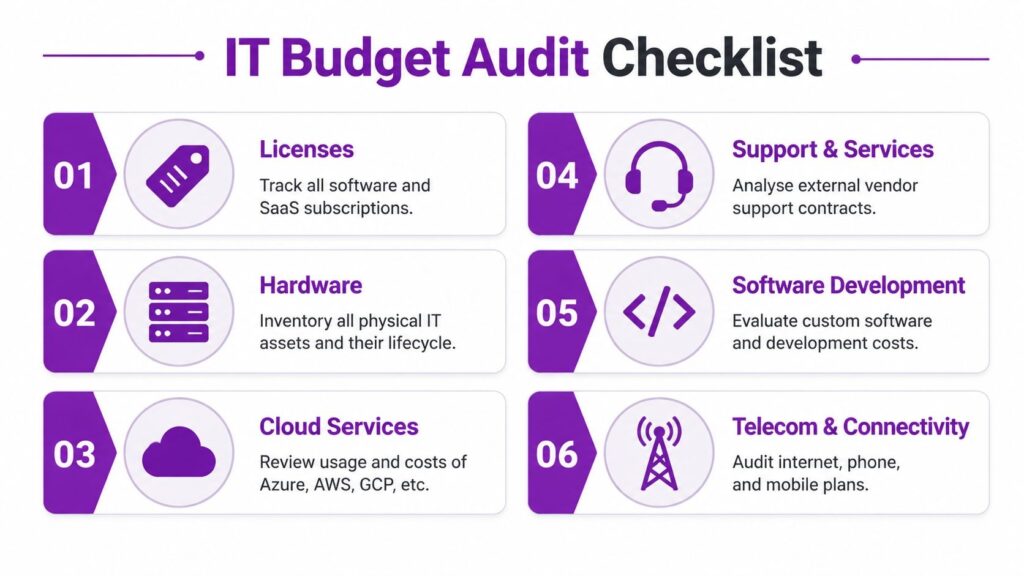
Build one spreadsheet or register with these categories:
- Software licences including Microsoft 365, Adobe, security tools, CRM add-ons, payroll, and niche line-of-business apps
- Cloud services covering Azure subscriptions, backup platforms, third-party hosting, and managed databases
- Hardware and lifecycle costs such as laptops, servers, monitors, warranties, leases, and replacement stock
- Support and services including managed support, project work, cyber security monitoring, and external consultants
- Telecoms and connectivity such as broadband, leased lines, mobile contracts, Teams calling, and legacy phone systems
- Development and integration covering custom apps, support retainers, API connectors, and low-code platforms
If you don’t already track assets formally, proper IT asset management guidance helps bring software, devices, and lifecycle decisions into one usable view.
Look for waste that finance reports miss
An audit only works if you go beyond the invoice total. The invoice tells you what you paid. It doesn’t tell you whether the spend was justified.
A good review checks:
AreaWhat to questionTypical issueUser licencesIs the named user still active and in the right roleLeavers and over-licensed staffShared toolsDoes another platform already cover this functionDuplicate storage or meeting softwareCloud workloadsIs the environment still used as designedTest systems left runningSupport contractsAre multiple vendors covering similar workOverlapping support agreementsHardwareIs the device due for replacement or still fit for purposePremature refresh decisionsConnectivityIs the tariff still suitableLegacy telecom pricing
A line item can be “in budget” and still be wasteful. Budget discipline and spend discipline aren’t the same thing.
Use a practical review order
Don’t try to inspect every line equally. Start where the waste is easiest to prove.
-
People-based spend first
Review named licences, user accounts, and service assignments. Staff movement creates easy overspend.
-
Recurring subscriptions next
Monthly or annual SaaS charges often continue by inertia.
-
Cloud consumption after that
Azure and hosting costs usually need a technical review, but they can hold large avoidable charges.
-
Then longer-term contracts
Support agreements, connectivity, and hardware leases need more planning but often offer meaningful savings.
Separate essential spend from optional spend
Many businesses rapidly gain clarity. Mark each cost as one of three types:
- Core operational for systems the business can’t run without
- Risk reduction for security, backup, compliance, and resilience
- Optional or duplicate for tools with overlapping value or weak ownership
That categorisation changes the conversation. You stop debating whether “IT is expensive” and start deciding what deserves protection, what needs reshaping, and what can go.
A strong audit won’t produce savings on its own. It gives you the control to make good decisions quickly. Without it, cost reduction turns into guesswork, and guesswork usually cuts the wrong thing.
Quick Wins for Immediate Microsoft 365 Savings
The fastest place to cut waste is usually Microsoft 365. It’s widely used, billed regularly, and often left on autopilot. That’s why it creates some of the quickest wins.
A 2023 UK-specific analysis found that 68% of East Midlands firms were overpaying for redundant SaaS apps by an average of £4,200 annually per business, primarily due to unoptimised Microsoft 365 deployments. The same analysis noted that by auditing and centralising services, some businesses cut their Microsoft 365 bill by up to 30% according to the UK FSB analysis referenced here.

The licence review most firms put off
The common pattern is simple. A business grows, buys licences quickly, and then never revisits the decisions. Staff change roles. Contractors finish. Temporary upgrades become permanent. Premium plans get assigned “just in case”.
That’s why a Microsoft 365 review should answer these questions for every user:
- Do they still work here
- Do they need the plan they have
- Do they use the features that justify the cost
- Would a frontline, business, or enterprise licence fit better
- Are shared mailboxes, kiosks, or alternative setups more sensible
The biggest savings often come from a basic mismatch between user need and licence tier. A warehouse supervisor, field worker, or occasional user rarely needs the same plan as a finance lead or compliance manager.
If you’re reviewing options, a proper Microsoft 365 licensing review helps compare what users need against what’s currently assigned.
Consolidate the tools you already pay for elsewhere
A lot of businesses buy extra software because one team needed a quick fix. File transfer becomes Dropbox. Internal messaging becomes another chat app. Meetings expand into a separate video platform. Notes and intranets sprawl into standalone subscriptions.
That approach feels harmless at first. Over time, it creates cost, confusion, and support overhead.
Microsoft 365 already includes tools that can replace a lot of that duplication:
Existing extra toolMicrosoft alternativeCost benefitSeparate file storageOneDrive and SharePointRemoves overlapping storage feesExtra meeting platformMicrosoft TeamsReduces duplicate collaboration spendBasic intranet toolSharePointKeeps content in one tenantManual approvals by emailPower Automate approvalsCuts admin time and errors
A sensible consolidation plan doesn’t force every feature into Microsoft just because it exists there. It asks a narrower question. Is the paid third-party tool doing something unique, or are you paying twice for a common function?
Practical rule: if a paid app solves a problem already covered by Teams, SharePoint, OneDrive, or standard Microsoft security features, justify it in writing or remove it.
Storage is often the silent problem
Storage creep looks cheap until pooled capacity and versioning policies start pushing costs up. Teams create duplicate document libraries. Staff save the same files in multiple locations. Nobody archives inactive content. Retention settings become excessive because no one wanted to challenge them.
That’s why the best Microsoft 365 savings don’t come from licence changes alone. They come from governance. Better version control, archive rules, ownership of SharePoint sites, and clear retention decisions all reduce bloat.
Here’s a useful visual overview before you start reviewing your tenant:
What works and what doesn’t
What works
- Role-based licensing rather than giving everyone the same plan
- Quarterly user reviews led jointly by IT and finance
- Consolidating storage and collaboration into Microsoft-native services
- Removing inactive accounts quickly after staff leave or projects end
What doesn’t
- Buying the highest tier by default
- Letting departments procure overlapping apps
- Ignoring storage governance
- Treating Microsoft 365 as fixed overhead instead of manageable spend
The reason Microsoft 365 optimisation works so well is simple. It doesn’t usually require a long transformation programme. You can identify waste, adjust assignments, and start seeing impact within the next billing cycle if the environment is reviewed properly.
Strategic Azure and Cloud Infrastructure Optimisation
Azure costs usually rise for a different reason than Microsoft 365 costs. Licence waste is often administrative. Azure waste is often architectural. Environments grow quickly, projects move into production, and pricing stays on the easiest setting rather than the best-value one.
That’s where cloud spending needs a more deliberate approach.
A useful benchmark comes from a UK mid-market study showing that businesses optimising Azure with reservations and savings plans have achieved 30% to 50% reductions in compute spending, and one Leicester-based charity reduced annual Azure spend from £52,000 to £31,200, a 40% drop, by applying Azure Hybrid Benefit and right-sizing non-production resources, according to this Azure cost optimisation reference.
Pay as you go is easy and expensive
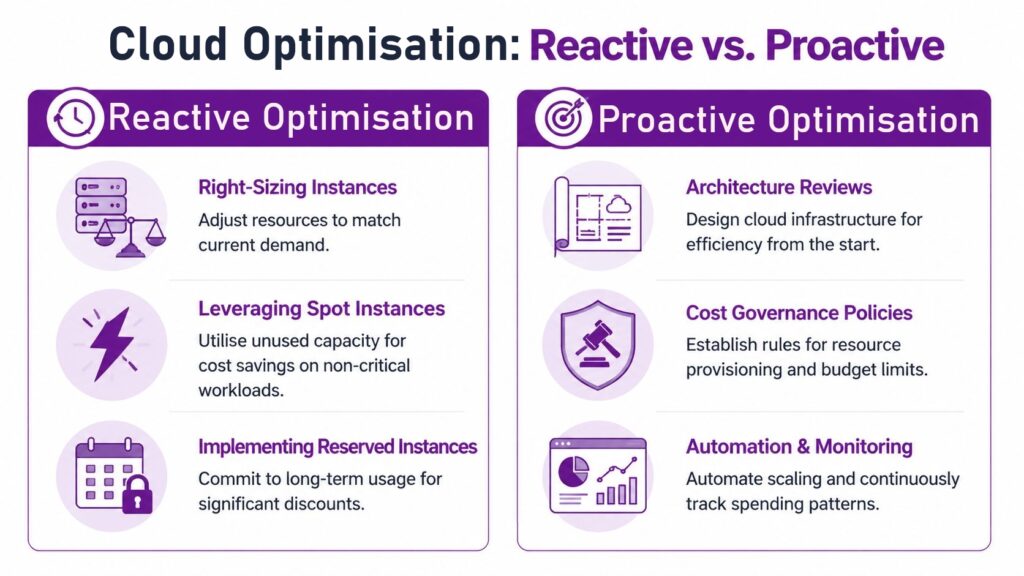
Pay-as-you-go pricing has a place. It’s useful for uncertain demand, short-term projects, and new services where usage patterns aren’t stable yet. The mistake is leaving mature workloads on that model when the business already knows they’ll be there for the long term.
Stable virtual machines, application servers, SQL workloads, and Dynamics-related services are often better candidates for:
- Azure Reservations for committed usage
- Savings Plans where consumption is predictable but may vary
- Azure Hybrid Benefit where existing qualifying licences can reduce cloud cost
- Scheduled shutdowns for development and test systems outside working hours
The trade-off matters. Reservations can save money, but only if the workload is stable. If the estate is likely to change materially, a rigid commitment can lock in the wrong shape of spend.
Right-sizing is more than shrinking everything
Some directors hear “cost optimisation” and assume the answer is to make servers smaller. That’s too blunt. Right-sizing means matching compute, storage, and database tiers to actual need, not only choosing the cheapest option.
A practical Azure review checks:
ComponentQuestion to askCommon wasteVirtual machinesIs usage consistently below provisioned capacityOversized computeStorageIs old data sitting on premium tiersHigh-cost storage retained unnecessarilyNon-productionDoes this need to run around the clockDev and test left active overnightNetwork and backupsAre policies aligned to business needPaying for excessive retention or duplicate protectionLegacy lift-and-shift workloadsShould this remain as-is in AzureOn-prem design copied into cloud without optimisation
Cloud waste often comes from good intentions. Teams build in extra headroom to avoid risk, then nobody comes back to tune it.
Governance beats one-off clean-ups
A one-time Azure tidy-up is useful, but it won’t hold unless governance follows it. Cloud estates drift. New resources appear. Teams deploy quickly. Without rules, the same waste returns under different names.
The controls that make a real difference are straightforward:
- Naming and tagging standards so every resource has an owner and purpose
- Budget alerts that flag unusual spend patterns early
- Approval rules for new production workloads
- Routine architecture reviews to catch drift before it becomes permanent cost
- Environment schedules for non-production resources
That governance doesn’t need to be bureaucratic. In fact, heavy process often fails because teams work around it. The strongest approach is lightweight but enforced. Every resource should have ownership. Every monthly bill should be reviewed. Every persistent workload should justify its pricing model.
The Azure decisions that usually pay off
Three choices tend to separate efficient Azure estates from expensive ones.
First, businesses commit only where usage is stable. That’s where reservations and savings plans produce value.
Second, they use existing licensing rights intelligently. Azure Hybrid Benefit is often missed because finance and IT review cloud spend separately. They need to review it together.
Third, they stop treating non-production environments like permanent production assets. Development, test, training, and proof-of-concept workloads can consume a surprising amount of budget if nobody governs uptime.
The point isn’t to make Azure cheap at all costs. It’s to make Azure intentional. When the architecture, licensing, and governance line up, cloud spend becomes easier to predict and much easier to defend.
If you need specialist help beyond a one-off review, businesses often use managed Azure services to keep that governance consistent month after month.
Using Automation and AI to Reduce Operational Overhead
The most effective cost reduction isn’t always a lower software bill. Sometimes it’s fewer manual tasks, fewer delays, and less staff time wasted on repetitive work. That’s where Power Platform and Copilot can earn their place.
Used badly, AI and automation add cost. Used properly, they remove operational drag that businesses have tolerated for years.

Start with the repetitive work nobody owns
Most firms have a long list of manual jobs that are “only a few minutes each”. Chasing approvals. Moving invoice details into spreadsheets. Copying form responses into another system. Renaming and filing documents. Sending the same internal reminders every week.
Individually, each task looks too small to matter. In aggregate, they create a serious cost in payroll, delay, and frustration.
Power Automate is strong here because it doesn’t require a huge custom development project to fix ordinary process waste. Common examples include:
- Invoice approvals routed automatically to the right manager
- Employee onboarding steps triggered from a single HR form
- Document filing rules that place files in the correct SharePoint library
- Reminder workflows that replace manual chasing by email
- Data movement between Microsoft Forms, Outlook, Teams, Excel, and Dynamics 365
The same principle applies to Power Apps.
https://www.f1group.com/how-to-reduce-it-costs/

