Software Asset Management: Cut Costs & Boost Security
Software Asset Management (SAM) is all about getting a firm grip on the software your business uses every single day. Think of it like managing a fleet of company vehicles; you need to know what you own, where it is, who’s using it, and whether it’s actually earning its keep. Without this control, it's easy to waste money on unused licences and stumble into some serious, and expensive, legal trouble.
What Is Software Asset Management and Why It Matters
It’s crucial to understand that software asset management isn't a one-and-done task. It’s an ongoing business strategy. The goal is to gain total visibility over everything from traditional desktop applications to complex cloud subscriptions. Without it, companies are almost always overspending on "shelfware"—software licences that just sit there, gathering digital dust. Worse, they might be running without the right number of licences, leaving them wide open to hefty fines during a vendor audit.
This process is a key piece of a much larger puzzle. For a deeper look into how this fits into the bigger picture, you can learn more about IT Asset Management in our detailed guide.
The True Cost of Unmanaged Software
Letting your software run wild creates problems that go far beyond a bloated budget. Every unmanaged or unpatched application on your network is a potential backdoor for cybercriminals. These security gaps are exactly what attackers look for, and a successful breach could lead to a major data leak, grinding your operations to a halt and shattering your company's reputation.
A solid software asset management programme gets right to the heart of these issues, delivering three massive wins:
- Cost Control: It shines a light on redundant applications and unused licences, freeing you up to reallocate that budget or simply cancel what you don’t need. This isn't small change; it often helps reclaim up to 30% of a company's software spend.
- Enhanced Security: By building and maintaining a complete software inventory, SAM ensures every application is accounted for, patched, and kept up to date. This systematically closes the security loopholes that shadow IT and forgotten apps create.
- Confident Compliance: It gives you all the evidence you need to sail through a software audit from vendors like Microsoft, Adobe, or Oracle. You can face these reviews with confidence, avoiding the stress and unexpected fines that can easily run into tens of thousands of pounds.
With cloud services like Microsoft 365 and Azure now at the core of most businesses, having a clear SAM strategy is no longer a 'nice-to-have'. It's absolutely fundamental to your financial health and operational security.
Just imagine this common scenario. A mid-sized UK firm does a SAM review and uncovers 50 premium Microsoft 365 E5 licences assigned to staff who only really need basic email and documents. By moving them to a more suitable, cheaper plan, the company could easily save over £15,000 every single year. That’s the real-world power of effective software asset management—it turns your IT from a cost centre into a real source of strategic value.
Unlocking the Business Benefits of Effective SAM
A proper Software Asset Management (SAM) strategy does far more than just count licences. When done right, it delivers real, measurable advantages that strengthen your business from the ground up. Think of it as turning a messy, expensive software portfolio into a well-oiled machine that saves you money, tightens your security, and keeps you on the right side of compliance rules.
The first, and often most welcome, benefit is the impact on your budget. It’s a common but painful truth that many businesses are haemorrhaging money on 'shelfware' – software that’s paid for but sits unused. Some studies show this waste can eat up as much as 30% of a company's entire software spend. That’s a huge sum of money just waiting to be reclaimed.
Reclaim Your Budget from Wasted Spend
Good software asset management shines a bright light on where every penny is going. By tracking what software is actually being used against what you've paid for, you can quickly spot redundant apps, overlapping subscriptions, or staff on the wrong licence tier.
We see this all the time. A mid-sized UK firm we worked with was analysing its Microsoft 365 usage and found dozens of employees had premium E3 licences when all they really needed was basic email and Office apps. By simply 'right-sizing' those users to a more suitable plan, the company cut its annual software bill by over £30,000. That’s money that can go straight back into growing the business.
"Software Asset Management is not just an IT function; it's a financial strategy. By optimising what you already own, you can fund innovation and growth without increasing your overall spend."
This process, often called licence harvesting, is all about getting the absolute maximum value from every single software licence you own. It’s a core part of any smart SAM programme.
Bolster Your Cybersecurity Defences
Beyond the balance sheet, SAM is one of your most important lines of defence against cyber threats. Every unmanaged, unauthorised, or out-of-date piece of software on your network is a potential weak spot for attackers to exploit. This ‘shadow IT’ creates dangerous blind spots for your security team.
A solid SAM programme slams that door shut. It gives you a complete, up-to-date inventory of all software in your business, ensuring every single application is:
- Tracked: You know exactly what’s running on your network and who is using it.
- Approved: No more rogue installations. Every app is vetted and authorised.
- Patched: You can systematically roll out security updates, closing vulnerabilities before they become a problem.
By getting a firm grip on your software environment, you dramatically shrink your attack surface and make your organisation a far less tempting target for cybercriminals.
Achieve Confident and Continuous Compliance
Finally, effective software asset management is your ticket to stress-free compliance. Software giants like Microsoft, Adobe, and Oracle are becoming more active in auditing customers to ensure they are licensed correctly. Facing an unexpected audit can grind your operations to a halt, pulling key people away from their real jobs.
Getting caught out can lead to hefty financial penalties, sometimes running into tens of thousands of pounds. A key advantage of effective SAM is its ability to significantly reduce an organisation's exposure to these financial penalties and legal issues by proactively engaging in robust regulatory compliance risk management.
With a SAM programme in place, you always have a clear, accurate picture of what you own versus what you're using. This means you can face any vendor audit with confidence, armed with the data to prove you're compliant. It’s about protecting your finances, your reputation, and your peace of mind.
Take control of your software assets and unlock significant savings. Phone 0845 855 0000 today or Send us a message to discuss your Software Asset Management strategy.
The Core Processes of a Successful SAM Strategy
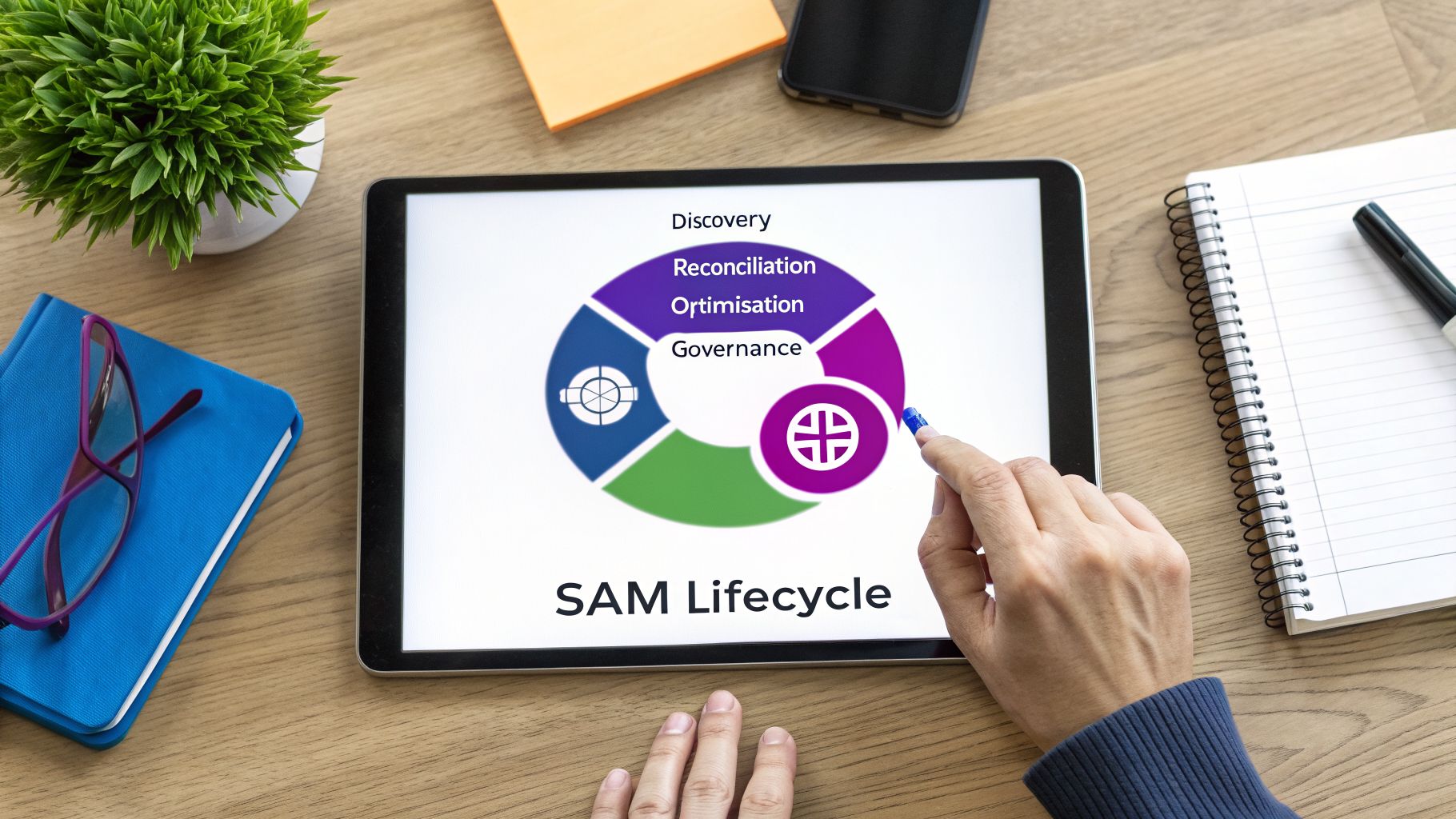
Getting a grip on your company’s software isn’t a one-and-done project. The most effective way to think about software asset management is as a continuous, repeating cycle. This makes the whole process far less daunting.
A solid SAM strategy breaks down into four logical stages. Each one builds on the last, creating a powerful system for controlling costs, ensuring compliance, and tightening security across your entire software estate. This cyclical approach stops SAM from being a reactive scramble during an audit and turns it into a proactive business process that adds real value.
Let's walk through each of these core stages.
1. Discovery and Inventory
It’s an old saying, but it’s true: you can’t manage what you can’t see. This is why the first and most critical process is Discovery and Inventory. It’s the bedrock of your entire SAM programme.
This stage involves scanning your whole IT environment—every server, desktop, laptop, and even virtual machine—to find every single piece of software installed. It’s not just about finding the big applications like Microsoft Office. A proper discovery uncovers everything: forgotten utilities, freeware downloaded by staff, and multiple versions of the same app scattered across different departments.
The end goal is a single, accurate, and centralised inventory. This becomes your one source of truth for all software. Without this clear picture, any attempt at management is pure guesswork.
2. Licence Reconciliation
Once you know exactly what’s installed, the next process is Licence Reconciliation. Think of this as the detective work. You’re matching the software you found in your inventory against your purchase records and licence agreements to answer one crucial question: "Do we have the legal right to use everything we have installed?"
Here, you meticulously compare what’s on the network to the licences you’ve actually bought. The result is a document called a Licence Position Statement, which gives you a clear snapshot of your compliance status with each vendor. This instantly highlights your risks and opportunities:
- Under-licensed (Compliance Risk): You have more installations than licences. This is a red flag, as it exposes you to major financial penalties if you’re audited.
- Over-licensed (Financial Waste): You own more licences than you’re using. This is simply wasted money that could be invested elsewhere in the business.
For example, your inventory might show 150 installations of a design program, but you can only find proof of purchase for 120 licences. If each licence costs £400, that’s a £12,000 gap representing a serious compliance risk. On the flip side, you might own 500 licences for a project management tool but only 350 are being used, leaving 150 licences gathering digital dust.
3. Software Optimisation
With a clear licence position in hand, you can move on to the most valuable process: Optimisation. This is where you act on the data you’ve gathered, and it’s where the biggest cost savings from software asset management are found.
Optimisation isn’t just one action. It could involve re-harvesting unused licences from people who have left the company and reassigning them to new starters, saving you from buying new ones. It also means uninstalling unauthorised software to close security gaps and removing redundant apps where several tools are doing the same job.
Optimisation is about making intelligent, data-driven decisions to align your software spending with actual business needs. It’s the process that turns SAM from a compliance exercise into a powerful cost-control mechanism.
This is also where you’d look at cloud subscriptions for quick wins. For instance, analysing your Microsoft 365 usage might show that a group of users on expensive E5 licences (£48.70/user/month) only use basic features. Moving them to a more suitable Business Premium plan (£18.10/user/month) would create immediate and ongoing savings.
4. Governance and Reporting
Finally, to make sure all your hard work sticks, you need to establish strong Governance and Reporting. This process builds the policies and controls necessary to maintain your newly optimised software environment. It’s what makes SAM a sustainable, long-term practice.
Governance means setting clear rules for how software is requested, approved, installed, and eventually retired. This prevents the kind of software chaos you just cleaned up from creeping back in. To put an effective SAM programme in place, it helps to follow established 10 IT Asset Management Best Practices.
Regular, clear reporting proves the ongoing value of your SAM programme to leadership. By showcasing cost savings, improved compliance, and reduced security risks, you build support and ensure the SAM cycle keeps spinning, protecting the business for years to come.
Making Sense of Microsoft Licensing: Where Expert SAM Really Shines
For most organisations, Microsoft software is the backbone of their daily operations. But let’s be honest—its licensing is a notorious maze. The complex agreements, overlapping product suites, and constantly shifting rules can feel designed to confuse. This complexity, however, is exactly where expert software asset management proves its worth, turning a major cost centre into a lean, efficient asset.
Trying to navigate this world without a clear map almost always leads to overspending or falling out of compliance. A good IT partner cuts through the fog, demystifying the rules to ensure you only pay for what your teams genuinely use. This is particularly true for flagship products like Microsoft 365, Azure, and Dynamics 365, where small licensing mistakes can quickly become very expensive problems.
Tackling Microsoft 365 and Copilot Costs
Microsoft 365 is where most businesses unknowingly leak money. With so many plans available—from Business Basic all the way up to E5, and now with Copilot add-ons—it’s far too easy to put everyone on an expensive, feature-rich licence they’ll never fully use. A classic example is a frontline worker assigned a premium plan when a basic one would do the job perfectly.
Effective software asset management addresses this directly by:
- Understanding User Roles: It gets granular, looking at what different people and departments actually do day-to-day. This allows you to match their real-world software needs to the most cost-effective M365 plan.
- Right-Sizing Licences: It’s all about moving users from over-specified plans to more suitable ones. For instance, a user on an E5 licence (£48.70 per month) who only really needs the core Office apps could be moved to Business Premium (£18.10 per month). That’s a saving of £30.60 per user, every single month.
- Managing New AI Tools: With exciting new tools like Copilot AI costing an extra £24.70 per user, per month, it’s crucial to be strategic. SAM ensures these powerful tools go to the people whose roles will generate a genuine return on that significant investment.
A skilled managed service provider uses SAM to constantly review your M365 usage. They ensure you’re not just compliant, but that every pound spent on Microsoft licences is directly supporting your business goals.
Microsoft 365 Licence Optimisation Examples
A hands-on SAM strategy quickly identifies opportunities for savings. The table below shows a few common scenarios where businesses can optimise their Microsoft 365 spending by re-assigning licences based on actual usage.
ScenarioProblem (Without SAM)Solution (With SAM)Estimated Annual Saving per 100 UsersOver-Licensed Office WorkersUsers who primarily need Office apps (Word, Excel, Outlook) and Teams are on a high-tier E5 plan.Downgrade these users to a more appropriate Business Premium or E3 plan.£36,720 (based on a £30.60/user/month saving)Frontline Worker MismatchShop floor or field-based staff have Business Standard licences but only use Teams and email on mobile devices.Move users to the more affordable Microsoft 365 F3 (Frontline) plan.£12,000 (based on a £10/user/month saving)High Staff TurnoverLicences for employees who have left the company remain active and assigned, becoming "ghost" costs.Implement a process to immediately reclaim and re-allocate licences upon employee departure.£21,720 (based on reclaiming 10 Business Premium licences per year)
These examples highlight how quickly the savings add up. Without active management, these costs simply accumulate month after month, delivering zero value to the business.
Bringing Control to Azure Cloud Sprawl
Unlike the fixed per-user cost of Microsoft 365, Azure works on a consumption model. While this offers incredible flexibility, it also creates the risk of "cloud sprawl," where forgotten or unused resources quietly run up massive bills. A test environment left running over a weekend or a set of over-sized virtual machines can result in a truly shocking invoice.
Expert SAM brings financial governance and predictability to your cloud environment. It gives you the visibility to:
- See Everything: Identify every single active service, virtual machine, and storage account tied to your subscription. No more hidden costs.
- Monitor Actual Usage: Analyse consumption patterns to spot idle or underused resources that can be shut down or scaled back.
- Implement Budget Guardrails: Set up automated alerts to prevent costs from spiralling, helping you maintain a predictable monthly spend.
By applying SAM principles to Azure, you transform it from a potential budget black hole into a powerful, cost-controlled platform. Many organisations find that just identifying and shutting down non-production resources outside of business hours can cut their Azure spend by 15-20%. For more information on getting your agreements in order, you can explore the nuances of licensing a software solution with our expert guidance.
Optimising Dynamics 365 for Maximum ROI
Dynamics 365 is a fantastic suite of business applications, but its modular design makes licensing notoriously tricky. You might have users with full access to Sales, Customer Service, and HR modules when they only ever touch one. This is another classic case of paying for features you simply don't use.
A partner-led SAM programme will:
- Audit Usage Rights: Check that each user has access only to the specific modules their role requires.
- Reclaim and Reallocate: Identify and recover licences assigned to former employees or those who have changed roles, putting them back into a central pool for re-use.
- Align with Business Reality: Continually review whether your Dynamics 365 subscriptions still match your current business processes, ensuring you aren’t paying for legacy functionality.
Ultimately, expert software asset management is about getting the most value from your entire Microsoft investment. It ensures that whether you're using M365, Azure, or Dynamics, you are always compliant, secure, and financially efficient.
Your Phased Roadmap for SAM Implementation
Jumping into a full-scale software asset management programme can feel overwhelming. The biggest mistake I see companies make is trying to do everything at once—it's the classic "boil the ocean" problem.
https://www.f1group.com/software-asset-management/

