Awareness Security Training for UK SMEs on Microsoft 365
For any small or mid-sized business, your team is the first, and arguably most important, line of defence against cyber threats. Good security awareness training does more than just tick a box; it transforms your employees from potential risks into a vigilant human firewall, ready to spot and stop threats before they do any real damage.
Why Your Staff Are Your First Line of Cyber Defence
Let's be realistic: all the firewalls and antivirus software in the world can't stop a cleverly written phishing email that cons an employee into handing over their password. Technology is essential, of course, but cybercriminals are smart. They know it's often easier to trick a person than to break through a complex technical barrier.
This is why the human element is so critical—and unpredictable. One wrong click on a malicious link or an accidental overshare of sensitive information can render millions of pounds of security tech useless. It’s for this reason that proper security training has become a core business need, not just another IT job.
The Growing Gap in UK Business Security
Many businesses, particularly SMEs here in the East Midlands, are facing a dangerous gap between the cyber threats they face and their actual level of preparedness. It’s surprisingly common to see companies treating security as a purely technical problem, completely forgetting about the people who use those systems every day.
The reality is, without a team that knows what to look out for, your business is left wide open. The UK Government's Cyber Security Breaches Survey paints a stark picture of this vulnerability.
To put the UK situation into perspective, here are some key findings from recent government and industry reports.
UK Business Cyber Security Training Snapshot
Statistic
Finding (UK Businesses)
Cyber Attack Frequency
43% of businesses experienced a cyber attack in the past year.
Prevalence of Phishing
79% of businesses identified phishing as their primary threat.
Training Gap
A shocking two million small companies provide no cyber security training.
SME Vulnerability
Small and mid-sized firms are often seen as softer targets by attackers.
These numbers are a wake-up call. With phishing affecting 79% of UK businesses, this lack of training is a ticking time bomb, especially for firms in Lincoln, Nottingham, and Leicester that rely so heavily on tools like Microsoft 365 and Azure. You can dig deeper into the official data by reading the full government report on cyber security breaches in 2025.
The whole point of security awareness training is to change behaviour. It’s about building a culture where every single employee instinctively questions a suspicious email, protects their passwords, and genuinely understands their role in keeping the company’s data safe.
From Cost Centre to Strategic Investment
It’s time to stop thinking of security training as an expense. It's a strategic investment with a very clear return. A well-trained workforce directly lowers your risk of suffering a costly data breach, operational downtime, or serious reputational damage.
Just think about the potential fallout from a single successful attack:
- Financial Loss: Trying to recover stolen funds, paying regulatory fines under GDPR, and the general clean-up costs can be crippling.
- Operational Disruption: When your systems go down, productivity grinds to a halt, customer service suffers, and your entire business can be brought to its knees.
- Reputation Damage: Losing the trust of your clients is incredibly difficult to win back and can have a long-lasting impact on your business.
Consistent, high-quality training flips this scenario on its head. In fact, organisations with ongoing training programmes have seen employee-related security incidents fall by up to 72% in the first year alone. By giving your team the right knowledge, you’re not just satisfying a compliance requirement; you're building a resilient, proactive defence. We’ve written more on this in our article about the critical role of cyber security training for staff.
This guide will give you an actionable roadmap for building that human firewall.
Ready to build your human firewall? Phone 0845 855 0000 today or Send us a message to discuss your security needs.
Designing a Training Programme That Actually Works
Let's be honest, a one-off, dull PowerPoint presentation on security isn't going to cut it. If you want to build a genuine 'human firewall', you need a continuous, strategic training plan designed to create real, lasting changes in how your team behaves. Simply telling people to "be careful online" is a bit like telling them to "drive safely" – it’s well-intentioned but lacks the substance needed to prevent an accident.
The starting point is to ditch vague ambitions and set some hard, specific goals. What does success actually look like for your business? Instead of aiming for something fuzzy like "better security," define concrete targets you can actually hit.
Think along these lines:
- Reduce clicks on simulated phishing links by 30% within six months.
- Increase the rate of employees reporting suspicious emails by 50% over the next quarter.
- Get 100% of new starters to complete their core security training within their first week.
Goals like these give you a clear benchmark for success. They also make it much easier to justify the investment to leadership, turning your training from a tick-box exercise into a proper, performance-driven initiative.
This process is all about bridging the gap between an external threat and an internal vulnerability.
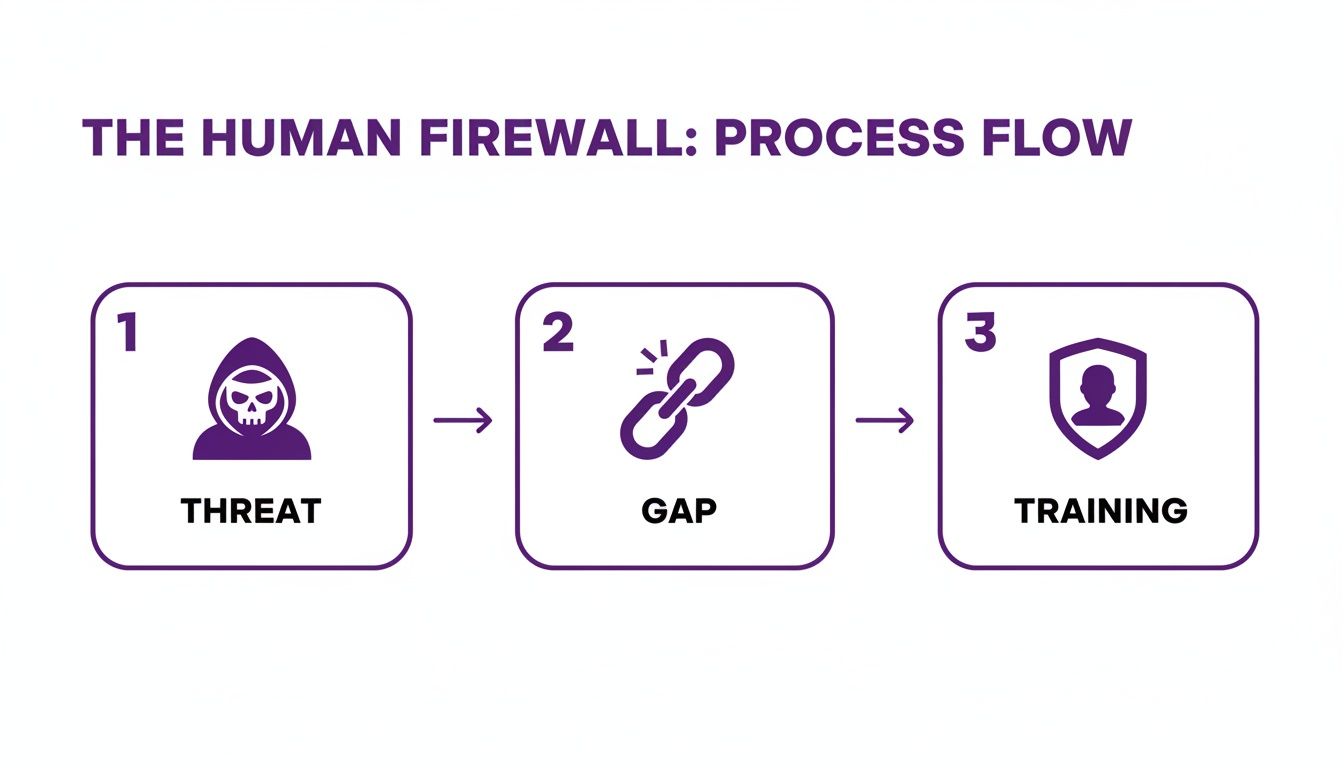
As you can see, threats will always be there, and gaps in awareness are almost inevitable. A structured training programme is the essential shield that stands in between.
Tailoring Content to Your Team
One of the biggest mistakes I see businesses make is rolling out generic, one-size-fits-all training. The reality is, the cyber risks facing your finance team are worlds away from those targeting your sales reps.
Your finance department is a prime target for sophisticated invoice fraud and business email compromise. Your sales team, on the other hand, is more likely to encounter social engineering on LinkedIn or credential theft through fake login pages. To make the training stick, it has to feel relevant.
Here’s how you can segment your audience and tailor the content:
- Finance Team: Focus squarely on invoice fraud, spotting spoofed executive emails (BEC), and securely handling financial data. Use real-world examples of fraudulent payment requests they might actually see.
- Sales & Marketing: Their training needs to cover social engineering risks on platforms like LinkedIn, credential harvesting, and the safe handling of customer data from CRMs.
- Senior Leadership: They don’t need the nitty-gritty. Give them concise, high-level briefings on the business impact of a breach, the risk of reputational damage, and their crucial role in championing a security-first culture.
- IT Department: This is where you can get technical. Provide advanced training on new threat vectors, incident response drills, and the specifics of securing your cloud infrastructure in Microsoft 365 and Azure.
When employees see how the training applies directly to their day-to-day work, they’re far more likely to sit up and pay attention.
Building Your Core Curriculum
While specialised training is key, every single person in the business needs a solid foundation in security fundamentals. This core curriculum is the backbone of your entire programme, covering the essential knowledge everyone must have to protect themselves and the company.
A strong core curriculum ensures that no matter their role, every member of your team has the baseline knowledge to spot and report the most common cyber threats, turning your entire workforce into a security asset.
This foundational training should always include these key topics:
- Phishing and Social Engineering: This is your top priority. Teach staff how to identify suspicious emails, smishing texts, and even AI-generated deepfake calls. Given that Microsoft is one of the most impersonated brands in the world, your training must include examples of fake Microsoft 365 login prompts.
- Password Hygiene: Drill down on the importance of using strong, unique passwords for different systems and, crucially, the power of multi-factor authentication (MFA).
- Secure Use of Microsoft 365: Show your team how to share files securely using OneDrive and SharePoint, identify malicious macros in Word and Excel documents, and use Microsoft Teams safely.
- Physical Security: It's not all digital. Remind staff about the simple things, like locking their screens, protecting company laptops when working remotely, and being aware of who might be looking over their shoulder in a coffee shop.
To keep everything on track and meet any regulatory requirements, it’s worth looking into employee training tracking software. This helps you monitor who has completed what, maintain accurate records for compliance audits, and prove you’re taking your security obligations seriously. A well-designed curriculum is the blueprint for building that all-important human firewall.
Using Microsoft 365 to Deliver Powerful Training
If your business is already running on Microsoft 365, you're sitting on a goldmine of tools that can deliver genuinely effective security training. Forget about bolting on another third-party platform. You can use your existing subscription to build a solid awareness programme that’s not only cost-effective but also woven directly into your team's daily workflow.
This approach just makes sense. You can streamline everything from running realistic phishing tests to hosting live training sessions and seeing who’s completed what. By using the tools your staff already know and use every day, you remove the friction that often comes with security training. It becomes a natural part of their work, not some clunky, separate task they have to dread.
Launching Realistic Phishing Campaigns with Defender
One of the best features you have at your disposal is Attack Simulation Training in Microsoft Defender for Office 365. This isn't just theory; it's a hands-on tool that lets you send safe, simulated phishing emails to your team. It’s the perfect way to see who’s paying attention in a completely controlled environment.
The real power here is in the realism. You can craft campaigns that look and feel just like the real threats landing in inboxes every single day.
- Credential Harvest: This classic sends users to a fake login page designed to trick them into giving up their username and password.
- Malware Attachment: An email arrives with a seemingly innocent attachment that, if opened, would mimic the behaviour of malware.
- Link in Attachment: A sneaky tactic where the dodgy link is hidden inside a Word or PDF file, designed to get past basic email filters.
- Drive-by-URL: A link that, when clicked, takes the user to a site that tries to run code on their machine in the background.
The most effective security awareness training connects theory with practice. Attack Simulation Training does exactly that, providing a safe space for employees to make mistakes and learn from them without exposing the business to actual risk.
The best part? If someone does click a link or download a file, the system can automatically enrol them in follow-up training that directly addresses the specific mistake they made. This immediate, contextual feedback loop is infinitely more effective than a generic annual presentation.
Creating a Central Security Hub with SharePoint
To build a strong security culture, you need consistency. Your team needs one single, reliable place they can go to find security policies, look back at old training materials, or get updates on the latest threats. A dedicated SharePoint site is perfect for this.
Think of it as your company's security library. You can build it out with clear sections for:
- Company Policies: Simple, easy-to-read documents covering password rules, acceptable use, and how to report an incident.
- Training Archive: A place to store recordings of past webinars, presentation slides, and links to on-demand learning.
- Threat Alerts: A simple newsfeed where you can post quick updates on active phishing scams or new social engineering tricks to watch out for.
- How-To Guides: Practical tips on things like setting up Multi-Factor Authentication (MFA) or securely sharing files.
Having this central hub empowers your people to find answers for themselves, reinforcing the message that security is a shared responsibility.
Hosting Live Sessions and Tracking Progress
Automated tools are fantastic, but you still need that human touch. Microsoft Teams is the ideal platform for hosting interactive training sessions, running Q&A panels with your IT team, or even doing quick "threat of the month" briefings. These live chats allow for real-time discussion and questions that pre-recorded videos just can't replicate.
To pull all of this together, Microsoft Viva Learning can be a real game-changer. It plugs straight into Teams, letting you assign, recommend, and track security training from both Microsoft's own library and other providers. You can easily build custom learning paths for different departments or for new starters, making sure everyone gets the right training at the right time. For more information, you can learn how to optimise your workforce with the advantages of Microsoft Viva.
By combining these tools you already have in Microsoft 365, you can build a layered, continuous, and genuinely effective security awareness programme without looking for another solution.
Putting Your Training Programme into Action and Measuring Success
You’ve designed the curriculum and picked your tools – now it's time to bring your security awareness programme to life. But getting it launched is only the first step. To make a real, lasting impact, you need a steady rhythm for delivery and a sharp eye on what you're measuring. If you aren't tracking progress with hard data, you're just guessing.
A well-planned annual calendar keeps security as a constant, gentle pressure, not a one-off event that everyone forgets by February. The aim is to keep good security habits front-of-mind. Mixing up how you deliver the training is also crucial for keeping your team engaged and helping the lessons stick.
Mapping Out Your Annual Training Calendar
Spreading your training activities across the year stops it from feeling like a chore. This approach creates a rhythm of continuous learning that slowly but surely weaves security into your company culture.
Here’s a sample calendar that you can easily adapt for your own business:
- Quarter 1 (Jan-Mar): Kick things off with a solid annual refresher course for everyone. Right after, run a baseline phishing simulation using Microsoft's Attack Simulation Training. This gives you your starting "phish-prone percentage".
- Quarter 2 (Apr-Jun): Shift the focus to micro-learning. Release a short, punchy video each month on a specific topic, like spotting fraudulent invoices or understanding the risks of public Wi-Fi. Run another phishing simulation, this time trying a different tactic, maybe one with a malicious attachment.
- Quarter 3 (Jul-Sep): Time for some interaction. Host a live session on Microsoft Teams for a Q&A with your IT team or a deep-dive into a real-world cyber attack that’s been in the news. Naturally, you'll follow this up with your third quarterly phishing test.
- Quarter 4 (Oct-Dec): As the year wraps up, zero in on role-specific training. Your finance and HR teams are prime targets, so give them some extra attention. Run one final phishing simulation and pull together an annual report for the leadership team to showcase the year's progress.
This cyclical approach is what makes the difference. It turns security awareness from a checkbox exercise into an ongoing business process.
The Metrics That Truly Matter
If you want to prove your training is worth the investment, you have to track the right Key Performance Indicators (KPIs). The right metrics don’t just show a return to the leadership team; they also tell you exactly which parts of your programme are hitting the mark and where you need to adjust. Forget vanity metrics and focus on data that shows a real change in employee behaviour.
Effective measurement goes way beyond simple completion rates. It's about tracking the tangible drop in risky behaviours and the rise in proactive, security-conscious actions from your team.
Your reporting should revolve around a handful of core KPIs that tell a clear story about your programme's impact.
Tracking the right data is what allows you to demonstrate the real-world value of your efforts. Below are the key metrics we always recommend focusing on.
Key Metrics for Measuring Training Success
Metric
What It Measures
How to Track It (Example Tool)
Phish-Prone Percentage
The percentage of users who clicked a phishing link or opened a malicious attachment in a simulation.
Track this directly within the dashboard of Microsoft Defender's Attack Simulation Training.
Employee Reporting Rate
The number of employees who proactively report suspicious emails using the 'Report Phishing' button in Outlook.
This is a crucial metric available in Microsoft Defender that demonstrates positive engagement.
Training Completion Rates
The percentage of staff who have completed their assigned training modules.
Monitor this through Microsoft Viva Learning or your chosen learning management system.
Incident Reduction
A decrease in the number of actual security incidents (e.g., malware infections, compromised accounts).
Analyse data from your security incident logs and compare it quarter-over-quarter.
These are the numbers that give you the evidence you need.
https://www.f1group.com/security-awareness-training-3/

